FAQ / Local LLM
SmallClaw 常见问题 SmallClaw FAQ
这一页先整理出普通用户最常问的 10 个问题,覆盖本地模型、安装试用、使用方式、安全、价格和进一步阅读。后续如果还有新问题,我们会继续往这里补充。 This page starts with 10 questions ordinary users ask most often, covering local models, installation and trial, usage, security, pricing, and where to read more. If new questions come up later, we will keep adding them here.
Copyright © 2026 Smallsoft Pty Ltd. All rights reserved. Copyright © 2026 Smallsoft Pty Ltd. All rights reserved.
SmallClaw 支持本地 LLM 吗? Does SmallClaw support local LLMs?
支持。SmallClaw 的模型请求会走你自己配置的模型服务,所以如果你接的是本地部署的模型服务,它就可以按本地 LLM 的方式工作。与此同时,权限、渠道、任务、运行历史和本地 Skills 的控制都仍然在本地 macOS 应用中完成。 Yes. SmallClaw sends model requests through the model service you configure, so if you connect a locally hosted model service, it can work as a local LLM setup. At the same time, permissions, channels, tasks, runtime history, and local skill control all remain inside the local macOS app.
换句话说,SmallClaw 支持本地 LLM 接入,但是否完全离线,取决于你接入的模型服务本身。 In other words, SmallClaw supports local LLM integration, but whether it is fully offline depends on the model service you connect.

本地 Gemma 模型怎么接入 SmallClaw? How do I connect a local Gemma model to SmallClaw?
做法很简单:先把本地 Gemma 模型以 OpenAI-compatible 的方式提供服务,再在 SmallClaw 里把这个服务当成一个本地模型源接入。以 Ollama 为例,通常可以先把服务地址设成 http://localhost:11434/v1,然后填入你实际拉起的 Gemma 模型名。
The setup is straightforward: expose the local Gemma model through an OpenAI-compatible service, then connect that service in SmallClaw as a local model source. With Ollama, you would typically point the endpoint to http://localhost:11434/v1 and use the actual Gemma model name you started.
在 SmallClaw 里,进入 Settings / AI Models,启用 Ollama (Local),填写 endpoint 和 model 名,保存后就可以在 Agent Console 里测试。
In SmallClaw, open Settings / AI Models, enable Ollama (Local), fill in the endpoint and model name, save the settings, and then test it in the Agent Console.
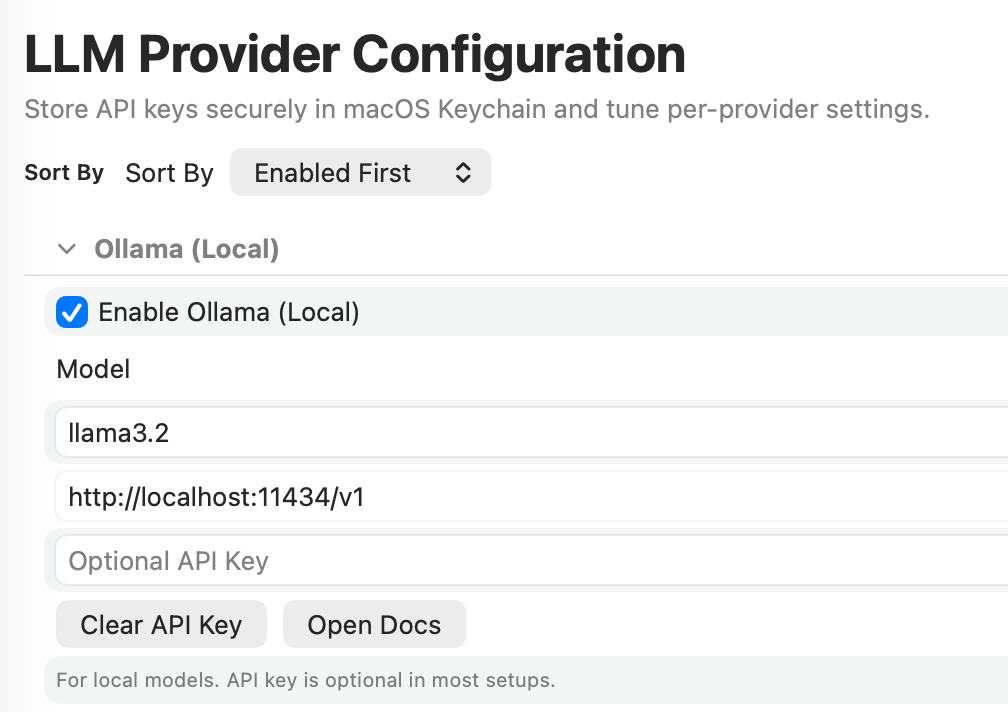
- 先确认本地模型服务已经按 OpenAI-compatible chat completions 暴露出来。 First confirm that your local model service is exposed as OpenAI-compatible chat completions.
-
在
AI Models里启用本地 provider,并填写正确的 endpoint 和 model 名。 Enable the local provider inAI Modelsand enter the correct endpoint and model name. -
保存后到
Agent Console里发一句简单请求,比如Hello,确认返回正常。 After saving, send a simple request inAgent Consolesuch asHelloand confirm that the response works.
如果连不上,优先检查三件事:endpoint 是否正确、model 名是否一致、以及本地服务是否真的是 OpenAI-compatible 接口。SmallClaw 会把本地 Gemma 当作日常对话模型、项目和任务的语义理解模型,以及本地优先、低延迟、隐私友好的工作模型来使用。 If it does not connect, check three things first: whether the endpoint is correct, whether the model name matches, and whether the local service is truly exposing an OpenAI-compatible interface. SmallClaw can then use local Gemma as a daily conversation model, a semantic understanding model for projects and tasks, and a local-first, low-latency, privacy-friendly working model.
SmallClaw 是什么? What is SmallClaw?
SmallClaw 是一个 macOS 原生 AI 工作代理,它不只是帮用户聊天或点击屏幕,而是把个人工作组织成项目、角色、任务、审批和自动化执行流程。 SmallClaw is a native macOS AI agent workspace that turns personal work into an organized, executable system. It does not stop at chat or screen control; it organizes work into projects, roles, tasks, approvals, and automated execution flows.
SmallClaw 和普通聊天型 AI 有什么不同? How is SmallClaw different from a normal chat AI?
普通聊天型 AI 主要回答问题;SmallClaw 更进一步,能把回答变成执行链路。它能管理渠道、任务、工作流、Skills 和本地权限,让 AI 不只是说话,而是真正做事。 A normal chat AI mainly answers questions. SmallClaw goes further by turning answers into execution chains. It can manage channels, tasks, workflows, skills, and local permissions, so the AI does not just talk; it actually does work.
SmallClaw 怎么安装和试用? How do I install and try SmallClaw?
最直接的方式是先下载试用版。SmallClaw 是一个独立的 macOS 应用,下载后就可以直接打开,不需要先搭环境或安装一堆依赖。想继续了解,先从产品主页和技术指南开始。 The easiest way is to download the trial first. SmallClaw is a standalone macOS app, so after downloading it you can open it directly without setting up an environment or installing a long list of dependencies. If you want to keep going, start with the product homepage and technical guide.
SmallClaw 需要先会编程吗? Do I need to know how to code?
不需要。普通使用只要会配置模型和渠道就可以。只有当你想进一步管理 Skills、自动化规则或更复杂的工作流时,才会更需要一点技术理解。 No. For normal use, you only need to configure the model and channels. You only need more technical understanding if you want to manage skills, automation rules, or more complex workflows.
SmallClaw 可以通过哪些渠道使用? Which channels can I use with SmallClaw?
SmallClaw 可以通过 WeChat、WhatsApp、Telegram、Slack、iMessage 等多种渠道接收任务。你可以把它理解成一个统一中枢,不同入口都可以把请求送进来。 SmallClaw can receive tasks through channels such as WeChat, WhatsApp, Telegram, Slack, and iMessage. You can think of it as a unified hub that accepts requests from multiple entry points.
SmallClaw 能做哪些实际工作? What practical work can SmallClaw do?
它可以帮助整理信息、推进任务、生成回复、处理工作流、调用本地能力,以及把分散的操作组织成可持续执行的流程。更简单地说,它的目标不是只回答,而是帮你把事做完。 It can help organize information, move tasks forward, draft responses, handle workflows, call local capabilities, and turn scattered actions into a sustainable execution process. In short, its goal is not only to answer, but to help get the work done.
SmallClaw 的数据和权限安全吗? Are SmallClaw data and permissions safe?
SmallClaw 的安全设计是本地优先的。敏感信息会尽量留在本机,权限由 macOS 和应用内机制共同控制,外来 Skills 也会先经过复审再进入运行链路。这样做的重点,是让用户始终知道它能做什么、不能做什么。 SmallClaw is designed with a local-first security model. Sensitive information stays local whenever possible, permissions are controlled by both macOS and app-level mechanisms, and external skills go through review before entering the runtime path. The goal is to keep it clear what the app can and cannot do.
SmallClaw 是按月订阅还是一次性购买? Is SmallClaw subscription-based or a one-time purchase?
你可以先试用,再根据自己的使用感受决定是否购买 Personal 或 Organization 工作流所需的授权。v1.5 之后,SmallClaw 会更清楚地区分 Direct 版和 Mac App Store 版:Direct 版按 Smallsoft 的授权和购买流程处理,Mac App Store 版按 Apple 的购买、恢复购买和更新流程处理。具体价格和授权方式以购买页面或对应商店页面为准。 You can try it first and then decide whether to buy the license you need for Personal or Organization workflows. Starting with v1.5, SmallClaw separates the Direct and Mac App Store versions more clearly: the Direct version follows Smallsoft's license and purchase flow, while the Mac App Store version follows Apple's purchase, restore, and update flow. Pricing and license terms are shown on the purchase page or the relevant store page.
Direct 版和 Mac App Store 版有什么区别? What is the difference between the Direct and Mac App Store versions?
两者都继续支持 Personal 和 Organization 工作流。区别主要在分发、购买、更新和部分系统集成流程:Direct 版通过 Smallsoft 官网和授权机制管理;Mac App Store 版通过 Apple 的商店购买、恢复购买、更新和账户规则管理。v1.5 也改进了首次启动时的法律条款、隐私确认、本地数据和权限说明,让用户更容易确认自己正在使用哪一种版本。 Both versions continue to support Personal and Organization workflows. The difference is mainly in distribution, purchase, update, and some system integration flows: the Direct version is managed through Smallsoft's website and licensing mechanism, while the Mac App Store version is managed through Apple's store purchase, restore, update, and account rules. v1.5 also improves the first-run legal, privacy, local data, and permission review flow so it is clearer which version you are using.